
A menswear brand from Rotterdam sent us a 14 MB ZIP file in March. Inside were three CSV exports from their Shopify admin — products, customers, orders — and a note that said every article we have ever written is in there somewhere. It was not. Shopify does not put articles in that export, and it does not export them anywhere else either.
That ZIP is the most common way people discover the limits of a Shopify export: not by reading documentation, but by opening the folder and counting what is missing.
What the Shopify admin does export
Log into a Shopify store, go to Products, Customers or Orders, and you can request a CSV of that object. In practice you get:
- Products, with variants, options, prices, weights, SKUs, barcodes and image URLs
- Collections and smart collections, as membership records rather than layout
- Customers with tags, addresses, total spend and note text
- Orders with line items, discounts applied, tax lines, shipping lines and refund rows
- Discount codes, gift cards, and the inventory CSV at product level
Shopify also lets you add supported metafield columns to the product and customer exports before downloading. That part matters later, so keep it in mind.
What it does not export
This is the list nobody publishes on a pricing page. None of the following can be pulled out of the admin as a file:
- Blog articles, their authors, categories, tags and publish dates
- The theme itself — sections, templates and any custom CSS
- Data written by apps: review counts, loyalty points, subscription contracts, wholesale price tiers
- Metafields created by apps that do not expose a column in the export screen
- Customer passwords, in any form
- Checkout customisation, custom pixels and marketing event definitions
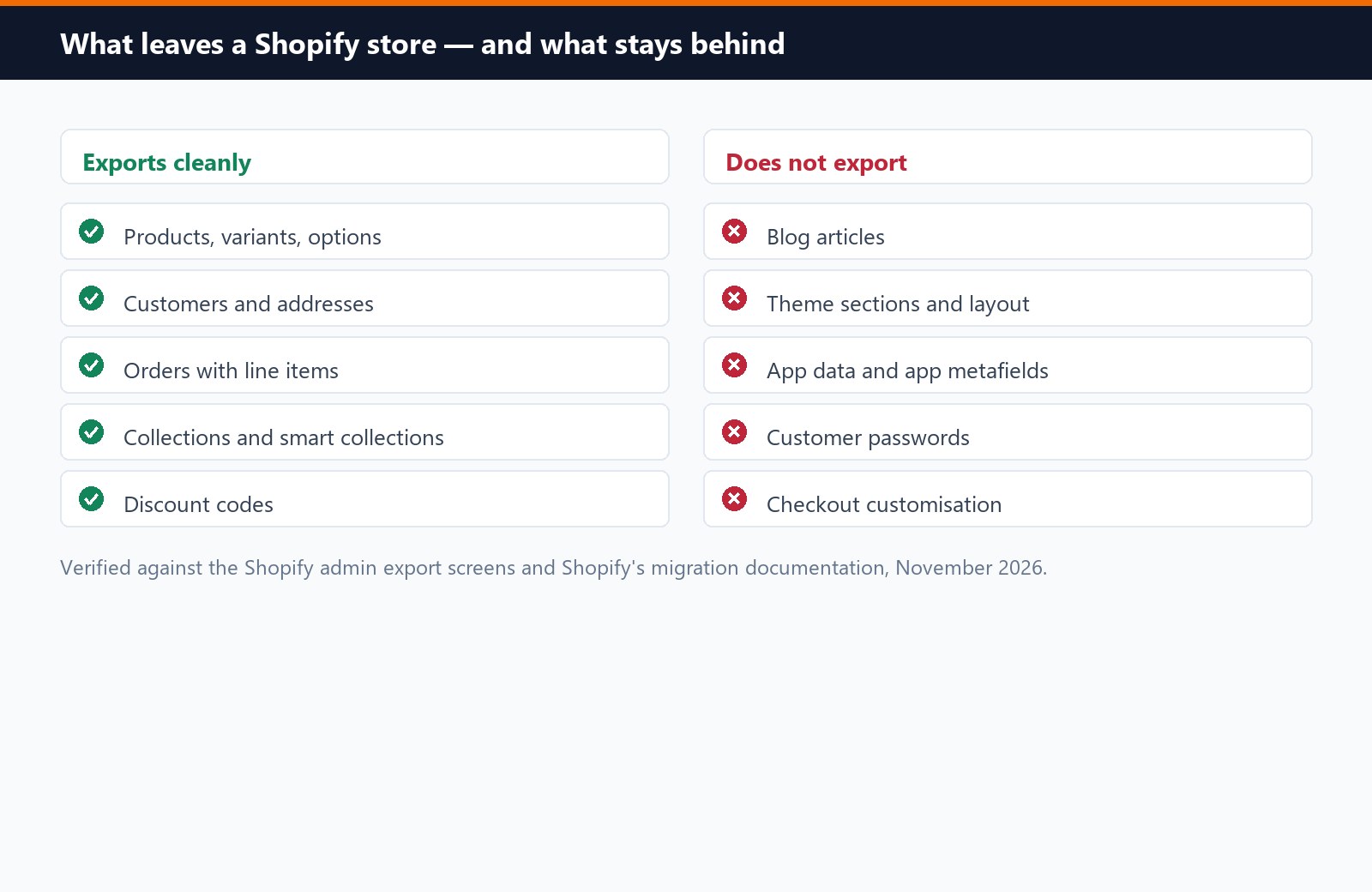
You can rebuild all of it, and we do, but it is a second workstream that runs beside the data import. Anyone quoting a Shopify migration as a single CSV job has not looked at a Shopify store with a blog and four paid apps.
The traps inside the CSV itself
The files exist, but a CSV of a live store is a snapshot of entropy. Six things break imports, in the order we see them:
- Three options, hard stop. Shopify allows three option axes per product; a fourth becomes a separate product record with a near-identical handle.
- Image URLs are CDN links, not files. They carry a size suffix and a version key, so the original has to be requested without them.
- Descriptions contain inline HTML, sometimes with base64 image payloads left over from the old editor.
- Guest orders have no customer record — imported alone they become orphan order rows.
- Refunds arrive as separate rows with negative totals, and double-importing them silently doubles your refund history.
- Excel eats leading zeros. Open an SKU column in a spreadsheet and 0012 becomes 12 before any of it reaches WooCommerce.
The customer password problem
Password hashes cannot leave one platform for another. That is not a Shopify limitation, it is how password storage is supposed to work. The practical consequence: on a 4,000-customer store, roughly 22% of people re-activate an account within the first month, 31% within three months, and the rest have to be treated as new customers unless you run a reset campaign at cutover. We send that campaign, with your branding, on the day the domain switches.
When you should not migrate
If your store has under 20 products and under 50 lifetime orders, do not pay for a migration. Rebuild the site and re-enter the catalog by hand; it takes a day and costs less than the redirect work alone. Same answer if the offer only works because of Shop Pay one-click conversion, or if you sell purely digital products through a single Shopify app that has no WooCommerce equivalent.
A migration earns its money when the store has history you cannot retype: 300+ products, several years of orders, a blog that ranks, and app subscriptions worth more per year than the build.
What a clean Shopify migration actually contains
The import is the easy half. The deliverables we hand over are a URL map covering every live /products/, /collections/, /blogs/ and /pages/ address, tested 301s, re-hosted images at original resolution, product schema and a reconciliation sheet where product count, order totals and customer count are compared line by line before launch day.
The full scope is on our Shopify to WordPress migration page, and if you are coming off a different platform, the platform-wide migration guide covers the same process with the quirks swapped. If your content lives in a Wix blog instead of Shopify, read the Wix export article first — the situation is worse, not better.
FAQ
Does Shopify export blog posts?
No. The admin exports products, customers, orders, discounts and gift cards, but there is no export for blog articles. Articles are re-created from the live storefront, or pulled through a third-party export app first if you want a source file.
Can I import Shopify CSVs straight into WooCommerce?
Not without cleaning. WooCommerce reads a different column set, and the Shopify file carries CDN image URLs, negative refund rows and option axes that need to become attributes. We map and clean the files, then reconcile counts with you before launch.
Will moving from Shopify hurt my rankings?
Only if the redirect map is skipped. Shopify URLs follow fixed patterns, so each live address needs its own tested 301 rather than a blanket rule. We verify indexing in Search Console and watch 404s for 30 days after cutover.
How long does it take?
Two to three weeks for most stores: about a week for data and staging, a week for the rebuild, a few days for redirects and cutover. Catalogs over 5,000 SKUs, or stores with subscriptions, sit at the top of that range.
- How to Hide a Contact Button on Specific Pages (Rules That Work)

- Catch Cart Hesitation: A Contact Bar on WooCommerce Cart & Checkout
- How to Take Enquiries While You Are Closed (Leave-a-Message Form)
- Contact Buttons for B2B Export Sites: Which Channel Comes First?
- How to Translate Your Contact Bar With TranslatePress or WPML