
Mloun Side Contact PRO
How to Hide a Contact Button on Specific Pages (Rules That Work)
Allow lists, deny lists, AND/OR rules and the five configurations that actually work on B2B sites.
How to Take Enquiries While You Are Closed (Leave-a-Message Form)
Instead of a dead contact button at midnight, collect name, contact and requirement — and get it by email in the morning.
How to Translate Your Contact Bar With TranslatePress or WPML
Some labels never appear in TranslatePress. Here is why CSS-generated text is invisible to translators, and how the plugin fixes it.
Woodmart’s Bottom Mobile Menu Is Covering Your Contact Bar — 3 Fixes
Woodmart's bottom mobile menu and a floating contact bar both pin to the bottom edge. Three fixes, including the one that survives theme updates.
Why Your Floating Button Disappears on Mobile (And How to Fix It)
The contact bar works on desktop but not on phones? Six settings and stacking issues that explain it, in the order worth checking.
How to Pre-fill a WhatsApp Message With the Product Name, SKU and Price
Make the WhatsApp button open with the product name, SKU, price and page URL already written — using variables, no code.
How to Show a WordPress Contact Button Only During Business Hours
Set weekday opening slots, split days for lunch, close holidays, and choose what happens after hours — without touching code.
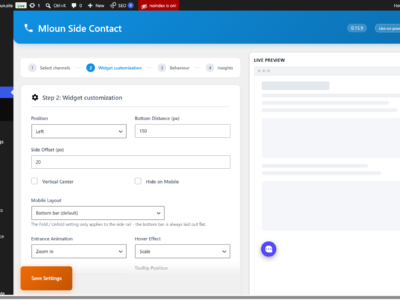
Every Widget Option Explained: Position, Styles, Folding and Mobile Behaviour
A complete reference to the widget customization screen: positioning, style presets, per-button colours, tooltips, folding, Back to Top, QR codes, and the two phone layouts that behave differently on purpose.
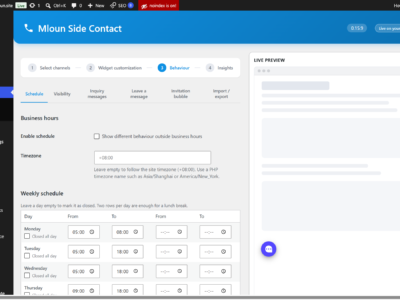
PRO Features: Business Hours, Display Rules, Inquiry Messages, Forms, Invitations and Click Insights
What the PRO screens actually do: a schedule that knows when you are closed, display rules that keep the bar off the checkout page, pre-filled inquiry messages, an on-site form, an invitation bubble, and click analytics.
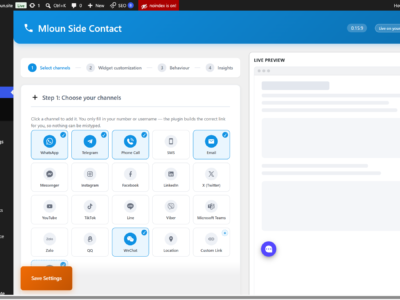
Mloun Side Contact PRO: Setup in 10 Minutes
From a fresh install to a working floating contact bar in about ten minutes: licence activation, adding channels, picking a style, and choosing the phone layout.