
A photographer in Lisbon wrote to us in June with a number that made the conversation short: 340 blog posts, five years of work, and a Wix dashboard with no export button for any of them. She had already tried the obvious things — the site backup, the RSS feed, the “export site” option in the editor. None of them returned an article.
Her question is the one people type into Google: can you export a Wix blog? The honest answer takes about four paragraphs, and none of it is Wix being unusually hostile. It is simply a rented platform, and rented platforms do not hand back the furniture.
The short answer
No. Wix has no blog export. The admin exports products, orders, contacts and form submissions as CSV files, but articles are not in that list, and no setting in the dashboard adds them. The RSS feed exists, and it is not a substitute — more on why below.
What Wix does export
To be fair to the platform, the commerce side is reasonably open. From a Wix dashboard you can pull:
- Store products with variants, options, prices and image URLs
- Orders, including line items and totals, for Stores, Bookings, Restaurants and Donations
- Contacts, with tags and custom fields
- Form submissions collected by Wix Forms
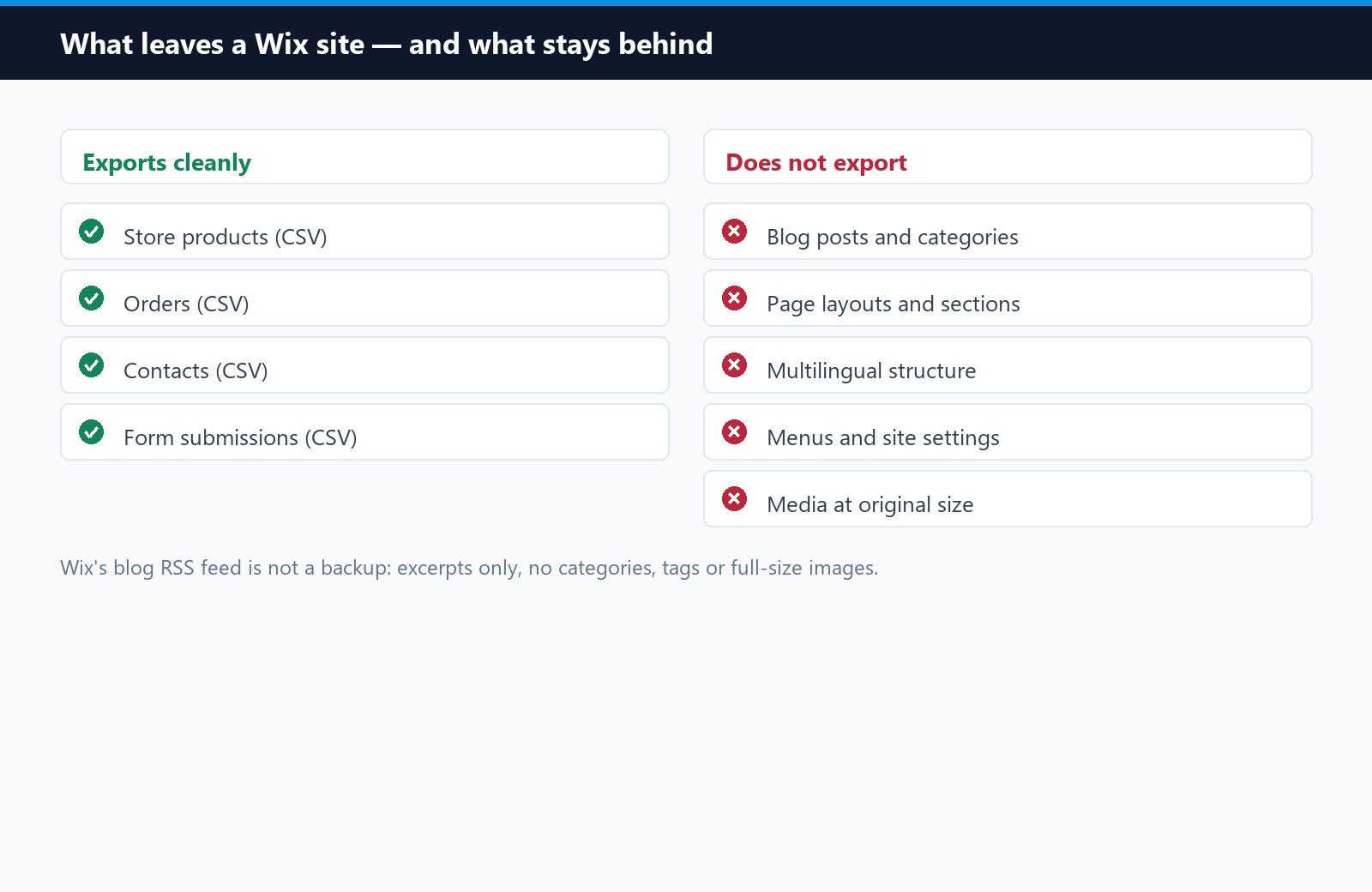
If your site is a blog with a small shop attached, the CSV exports cover the part you could have retyped in an afternoon and leave out the part that took five years.
Why the RSS feed is not a backup
Wix blogs publish a feed at /blog-feed.xml, and people reasonably assume a feed is an archive. It is not, for four reasons:
- It carries excerpts. The description element usually stops at the first paragraph, not the full article.
- Images arrive at thumbnail size. The feed embeds Wix CDN links with resize parameters baked in, so the “original” you save is 500px wide.
- Categories and tags are dropped. The structure that made the blog navigable does not travel.
- No canonical, author or scheduling metadata. Everything you need to reconstruct SEO after the move is missing.
A feed is a notification mechanism. Treating it as a backup is how people discover that 40% of their images are gone after import.
Three ways to get the articles out
Every Wix blog migration we have run came down to one of three approaches. They differ in cost, fidelity and how much of your week they consume.
One: copy and paste. Open each post in the editor, copy the text, paste into WordPress, re-upload the images by hand. Twelve to fifteen minutes per post if you are quick. On 340 posts that is roughly 70 hours of work, and the last fifty posts will be worse than the first fifty.
Two: a paid export app. Several third-party apps read a live Wix site and return HTML or CSV. They work, and they cost between $30 and $120 for a one-off run. What you get is raw HTML with Wix classes in it — useful as a source file, not as an import.
Three: crawl and re-create. What we do. Every published post is fetched from the live site, the article body is extracted, images are pulled at full resolution, and the post is rebuilt in WordPress with its original publish date, author, categories, tags and featured image. Throughput is 40 to 60 posts a day once the pipeline is tuned.
What still gets lost, even when the text survives
Even a clean rebuild loses a few things, and you should know which before you start: comments if you used Wix’s native system, embedded Wix apps inside posts, any custom post types created by apps, and draft posts that were never published (they are not on the live site, so there is nothing to crawl). Featured images survive if they were set; gallery layouts usually do not.
The URL map is the real work
Wix puts every article under /post/ with a slug that often has nothing to do with the title. WordPress will happily build new permalinks, and every old address becomes a 404 unless each one is mapped. For the Lisbon blog that meant 340 redirects, plus 60 for pages, plus 11 for store products — and a sitemap resubmission after cutover.
We treat that spreadsheet as a deliverable, not a task. You keep it, and it is what you check when Search Console shows a crawl error three weeks later.
When moving is the wrong call
If the blog has fewer than 20 posts, start fresh. Write the new site, copy the two or three articles that actually rank, and leave the Wix version online as an archive for a year. Same advice if Wix Bookings is what earns your revenue and the blog is a hobby — migrate the blog later, when the shop is separate.
Where migration pays back is the case in this article: hundreds of posts, images you cannot recreate, and traffic you cannot afford to lose. The scope and the redirect matrix are spelled out on the Wix to WordPress migration page. If you are weighing platforms, the platform-wide migration guide compares them line by line, and our Shopify export breakdown is the same exercise for a store instead of a blog.
FAQ
Can I export my Wix blog posts?
No. Wix has no export for blog articles — products, orders, contacts and form submissions export as CSV, but posts do not. Articles have to be copied, exported through a third-party app, or re-created from the live site.
Is the Wix blog RSS feed a usable backup?
No. The feed carries excerpts rather than full articles, embeds resized images, and drops categories, tags, authors and canonical URLs. It is a notification mechanism, not an archive.
Will moving my blog from Wix to WordPress hurt my rankings?
Only if old URLs are left unmapped. Every Wix /post/ address needs its own redirect to the new permalink; with that map in place and the sitemap resubmitted, rankings normally hold, and improve once page speed does.
How long does a 300-post Wix blog take?
About a week for the content rebuild at 40 to 60 posts a day, plus two or three days for the URL map, redirects and cutover. Larger image libraries add a day for the re-upload.
- How to Hide a Contact Button on Specific Pages (Rules That Work)

- Catch Cart Hesitation: A Contact Bar on WooCommerce Cart & Checkout
- How to Take Enquiries While You Are Closed (Leave-a-Message Form)
- Contact Buttons for B2B Export Sites: Which Channel Comes First?
- How to Translate Your Contact Bar With TranslatePress or WPML