
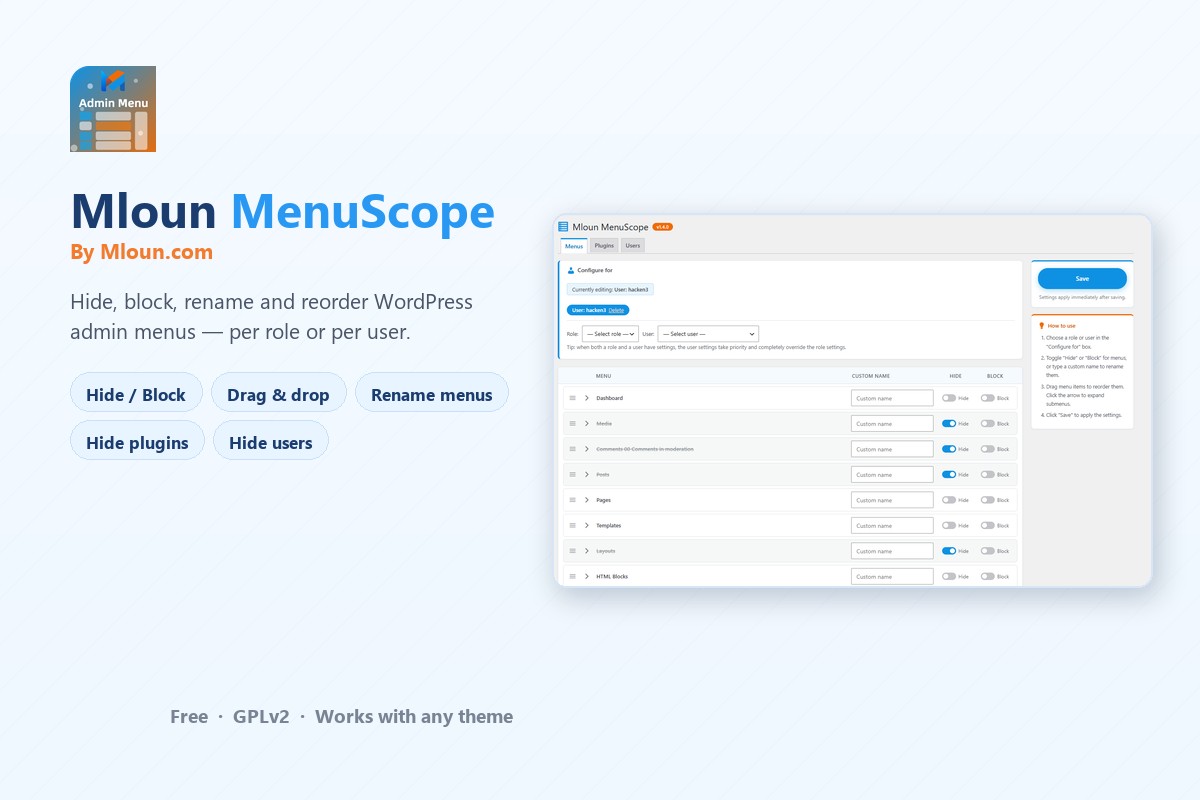


Mloun MenuScope — Hide, Block & Reorder WordPress Admin Menus
$0.00
Hide, block, rename and reorder WordPress admin menus per role or per user — plus hide plugins and hide users. Free, no code, fully reversible.
Clean Up the WordPress Admin — Without Writing Code
Mloun MenuScope lets you decide exactly what each role or user sees in the WordPress dashboard. Hide the menus a client does not need, block the ones they should never reach, rename anything that confuses them, and put the rest in the order that matches their workflow. It is reversible, it works per role or per user, and it never touches your theme.
🎯 What you can do
- Hide menus per role or user — the item leaves the sidebar, the page URL still works.
- Hide & block — the item leaves the sidebar and direct URL access returns 403.
- Drag & drop ordering — reorder top-level menus and submenus; submenus stay collapsible in the editor.
- Rename menus — give any menu or submenu a label that makes sense to your client.
- Hide plugins — a hidden plugin disappears from the Plugins screen and cannot be deactivated, deleted, updated or opened in the plugin file editor by that role or user. MenuScope can hide itself.
- Hide users — a hidden user is invisible to everyone else (Users screen, author dropdowns, direct profile URL) but can still log in and work normally.
🛡 Built to be safe
- Users with
manage_optionsalways keep access to the settings page — the plugin cannot lock an administrator out of its own settings. - Blocking core infrastructure menus (such as the Settings parent menu) is automatically downgraded to hide for administrators, so nobody can 403 themselves out of
wp-admin. - User settings override role settings — a user configuration completely replaces the same section inherited from their roles.
- Uninstalling removes its settings, including on every site of a multisite network.
📦 Install in 30 seconds
Install from the WordPress plugin directory, activate, then open Settings → MenuScope. No configuration file, no code, no external service. Requires WordPress 5.8+ and PHP 7.4+; tested up to WordPress 7.1.
🔗 Links
- WordPress.org plugin page — free download
- GitHub repository — source code, GPLv2
- Translations — community translations via translate.wordpress.org
All strings are translatable under the mloun-menroscope text domain. Need something the free version does not do? Tell us what you need.
Only logged in customers who have purchased this product may leave a review.



Reviews
There are no reviews yet.